Published Nov 20, 2026 · Updated Nov 20, 2026 · 16 min read
Zendesk Shopify Integration (2026): What It Shows, What the AI Can Do, and What It Costs
Shopify for Zendesk is a free app built by Zendesk that puts Shopify orders, refunds and cancellations in the ticket sidebar for human agents. What the sidebar shows, what Zendesk's AI agents can and cannot do with Shopify data per Zendesk's own docs, the documented setup and Shopify permissions, a worked month for a 4-agent store at 2,000 tickets, and documented fixes.
 Written by Andrew Hall, Editor
The Zendesk Shopify integration is Shopify for Zendesk, a free app built and maintained by Zendesk. It shows a customer's Shopify orders in the Zendesk ticket sidebar and lets human agents refund or cancel them without opening Shopify. Its main limit: it is built for human agents. In the Zendesk documentation RTCI opened on November 20, 2026, Zendesk's AI agents get no Shopify data from the app. Letting the AI look up an order means building a custom action against Shopify's API, which Zendesk lists for Suite Growth and above and does not support as code.
This guide covers what the sidebar shows, what Zendesk's AI agents and Copilot can do with Shopify data, the setup steps and Shopify permissions as Zendesk documents them, a worked month for a 4-agent store, and the documented fixes for common errors. Every product fact comes from Zendesk's help center, the Zendesk Marketplace or the Shopify App Store, all opened on November 20, 2026. Where an article sat behind a sign-in, this guide says so and does not describe it.
Which app is it, and who builds it?
There is one first-party app, listed under two names:
| Where | Listing name | Developer | Price of the app | What the listing shows |
|---|---|---|---|---|
| Zendesk Marketplace | Shopify for Zendesk | Zendesk ("Built by Zendesk") | Free | 16,500+ installs, version 3.0.6, last updated 6 November 2026, works for Shopify and Shopify Plus |
| Shopify App Store | Zendesk | Zendesk | The app itself has no fee; the listing shows Zendesk Suite plans | 3.2 stars from 96 reviews, launched March 11, 2013, English only |
Both listings describe the same four jobs: show Shopify customer and order data to agents, let agents process refunds and cancellations from the Support sidebar, open the order in Shopify by clicking its ID, and embed Zendesk's chat widget in the storefront.
The Zendesk Marketplace also carries third-party Shopify apps, such as Setloop, and AI add-ons from other vendors that act on Shopify orders inside Zendesk. They are separate products with their own pricing and are not covered here.
What do agents see in the ticket sidebar?
Zendesk's article Using the Shopify integration in Support and Chat describes the sidebar app. It finds the customer by matching the ticket requester's email address or phone number to a Shopify account or order. It only works on saved tickets: the article says it "doesn't display Shopify data in new tickets" until the ticket is saved with a requester.
| Where in the sidebar | What Zendesk says it shows or does |
|---|---|
| Order list | Order summary and a list of the customer's orders by order number |
| Expanded order | Order date and value, customer notes, payment status, fulfillment status, shipment tracking numbers, and whether the order can be cancelled or refunded (only when that option is on in Admin Center) |
| Order details | Line items, order notes and a payment breakdown |
| Refund | Unfulfilled, partially fulfilled or fulfilled orders. Full refund (all line items and shipping, items returned to inventory) or partial refund by quantity per line item, with Restock and Shipping checkboxes. Review refund, then Confirm refund |
| Cancel | Unfulfilled orders only. Pick a reason, Review cancellation, then Confirm cancellation |
| Tags | shopify_refunded after a refund and shopify_cancelled after a cancellation, for views and reports |
| Customer context panel | Shopify profile and event history (account changes, order and checkout actions), once an admin turns on Shopify profiles and events |
Three details from the same article matter day to day. After a refund or cancellation the sidebar does not update itself; the agent clicks the refresh icon to see the new status. The article does not say which agent roles can refund or cancel, so test this with a non-admin agent before go-live. And the app also appears in the Chat sidebar, matching on the email or phone a visitor gives, but Zendesk's setup article notes that "Zendesk Chat is being retired".
None of these articles describe editing an order, changing an address, creating a return or exchange, or issuing store credit from the sidebar. Plan on doing those in Shopify or through another app.
What can Zendesk's AI do with Shopify data?
Two Zendesk AI features touch this integration, and the Shopify story differs for each. AI agents talk to customers and are billed per automated resolution. Copilot, including its auto assist feature, helps human agents and is a $50-per-agent add-on. Here is where Shopify data reaches each, per the Zendesk articles linked in the next two sections:
| Capability | Who uses it | Plan needed (Zendesk docs, Nov 20, 2026) |
|---|---|---|
| Sidebar order data, refunds, cancellations | Human agents | Suite Team or higher; Support Team or higher with Chat |
| Auto assist Shopify lookups, refunds, cancellations | Human agents, AI suggests | Copilot add-on (Professional and higher) |
| AI agent answers from help center | Customers | Included in every plan |
| AI agent order lookups or actions via custom action | Customers | Suite Growth or higher, plus your own build |
Can a Zendesk AI agent answer "where is my order"?
Not with the Shopify app alone. Zendesk's help center answers this exact question in How can I link my AI agent with my customer orders. By default, it says, AI agents answer from your help center articles. To give order numbers and status from Shopify, you build a custom script that calls the platform's API. The article adds that Zendesk does not support or guarantee that code and does not support third-party technologies such as Shopify's API.
The current way to build that call is a custom action. Zendesk's About actions in AI agents calls custom actions "the recommended option for new connections": one API request that fetches or changes external data, added to a procedure or a dialogue block. The custom actions article sets the terms:
- Plan: Suite Growth, Professional, Enterprise or Enterprise Plus. Suite Team is not listed.
- Limits: up to 100 custom actions per account, a 10-second timeout, a 2 MB response cap, JSON responses only, HTTPS endpoints only.
- Credentials: stored in a connection, not in the action. Zendesk warns that a connection can have more access than your agents or customers, so scope it to what the action needs.
- No Shopify template: the article names no Shopify connection or prebuilt Shopify action.
So an AI agent can answer order-status questions from live Shopify data if you build and maintain the action, and the same route could change data, such as cancelling an order, if you build that too. None of the Zendesk articles RTCI opened describe a returns workflow for AI agents.
Two older routes are closing. The Make API call step, which Zendesk's own article illustrates with a Shopify order lookup, became legacy on February 2, 2025 and "will be removed from the product in 2027". And Zendesk's June 23, 2026 announcement put AI agents Essential and legacy bots into maintenance mode on August 31, 2026, with unmigrated Essential agents moved for you in January 2027. The announcement says the upgraded experience includes agentic capabilities that previously needed the Advanced add-on, and that automated resolution counts may change after migration. Build anything new on custom actions.
Zendesk's help center also has articles titled Using Shopify actions in action flows and About the AI agents Advanced add-on. Both required a Zendesk sign-in when RTCI tried to open them on November 20, 2026, so this guide does not describe them. Ask your Zendesk account team for them if you are scoping a build.
What can Copilot auto assist do with Shopify?
This is the one place Zendesk documents Shopify actions driven by AI. The recipe Canceling and refunding a Shopify order with auto assist says auto assist can "suggest Shopify order lookups, cancellations, and refunds" to a human agent. The listed actions: look up an order from details the customer gives, share order information including a tracking link, cancel and refund a whole order, refund selected items, and solve the ticket.
Requirements and rules from the recipe: the Copilot add-on, a connected Shopify storefront, and a written procedure that is "simple and concrete", tested before live use. Only unfulfilled or partially fulfilled orders can be cancelled; the example procedure sends customers with shipped items to the returns process instead, and does not cancel gift cards. Copilot is $50 per agent per month on annual billing and, per Zendesk's pricing page, can be added to Professional and higher plans.
Auto assist works through a human agent who accepts each suggestion. Zendesk bills automated resolutions only for issues the AI agent resolves without a human, so auto assist does not reduce that line of the bill.
How do you connect Shopify to Zendesk?
Before you start. Zendesk's Marketplace listing says you need administrator permissions in both Shopify and Zendesk. If your Shopify login is a staff account, Zendesk's connection error article lists the five Shopify permissions it needs: General > Orders, General > Customers, General > Apps and channels, Online store > Themes, and Administration > Manage settings. Neither article lists OAuth scopes; Shopify shows its permissions page during the connection.
The steps below follow Zendesk's setup article:
- Install the Zendesk app from the Shopify App Store and pick the storefront.
- Enter your Zendesk subdomain and submit. Shopify sends you to Zendesk Admin Center.
- Enter a connection name and click Connect. The Zendesk app installs in the storefront and you return to Admin Center.
- Open Apps and integrations > Integrations > Integrations > Shopify and click Configure on the storefront card.
- A sidebar app is turned on for the storefront automatically. In the Support card, tick Sidebar app, then turn on Refunds and cancellations if agents should refund and cancel from tickets.
- Optional: in the Web Widget section turn on Enable Web Widget, open the Shopify Theme Apps Editor, turn on Web Widget under App embeds, and save. Messaging is the default; Web Widget (Classic) installs only if messaging is off.
- Optional: turn on Shopify profiles and events so agents see Shopify activity in the customer context panel.
Setup adds one or more "Shopify order ID" fields to your ticket forms. Zendesk says they come from a legacy integration, can be ignored, and will be removed. To add another store, click New connection while logged in to that storefront in Shopify. To remove one, click Disconnect on its Configure page; that removes the sidebar apps, the storefront widget and the Zendesk app in Shopify.
For AI agent order lookups, the documented outline is: create a connection holding your Shopify credentials, create a custom action with the inputs (for example the order number), the API request and the outputs, add it to an AI agent procedure or dialogue block, and test it. Zendesk does not publish Shopify-specific steps for this, and Shopify's own API documentation governs the request.
What does it cost?
The app is free. The bill is your Zendesk plan, Copilot if you want auto assist, and automated resolutions from the AI agent. RTCI read Zendesk's US pricing page on November 20, 2026:
| Item | Annual billing | Monthly billing | Included automated resolutions |
|---|---|---|---|
| Support Team | US$19 per agent | US$25 | 5 per agent a month |
| Suite Team | US$55 per agent | US$69 | 5 per agent a month |
| Suite Professional | US$115 per agent | US$149 | 10 per agent a month |
| Suite Enterprise + Copilot | Talk to sales | Talk to sales | Not listed |
| Copilot add-on | US$50 per agent | Not listed | Professional and higher |
| Automated resolution, pay-as-you-go | US$2.00 each | ||
| Automated resolution, committed | Shown as £1.30 each |
The committed rate is shown in pounds. On November 20 the US page showed the committed automated resolution as £1.30 next to a US$2.00 pay-as-you-go rate, and its page title said "Starting from £15/month". RTCI's index records US$1.50 committed from its November 17 check, as in the Zendesk pricing guide. The worked month below uses the US$2.00 rate, the only automated-resolution price shown in dollars, and shows the US$1.50 figure as a second line. Get the committed rate and currency in your quote. Zendesk bills only Verified resolutions since May 18, 2026, as the Zendesk AI review explains.
If you subscribe through the Shopify App Store, the listing shows Suite Team, Suite Growth, Suite Professional and Suite Enterprise per agent, billed annually, in the visitor's local currency. RTCI saw rupees; at the listing's own rate (1 INR = 0.0107 USD) they convert to about $55, $89, $115 and $150. The listing says charges are billed every 30 days and that Zendesk may bill some charges separately from the Shopify invoice.
Worked month: a Shopify store with 4 agents and 2,000 tickets
Worked example. Assumptions: 4 agents on Suite Professional, annual billing, so Copilot can be added; 2,000 conversations a month, all offered to the AI agent first; the AI agent resolves 40.8%, RTCI's midpoint for Zendesk AI (realistic range 36–46%), which assumes it can look up orders through a custom action you have built; every one of those is a Verified resolution; no Enterprise discount, build cost or tax.
| Line | Math | Monthly |
|---|---|---|
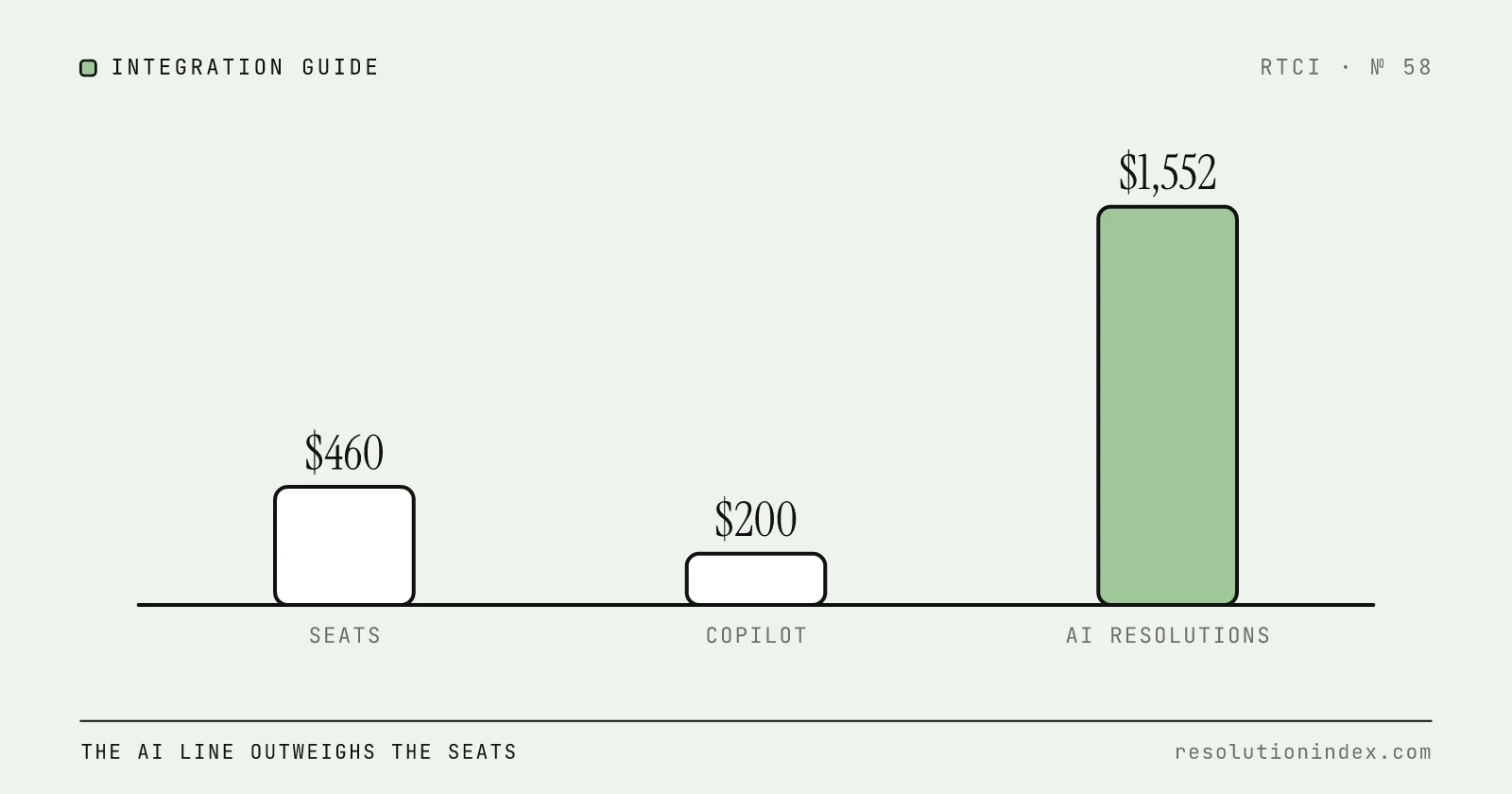
| Suite Professional seats | 4 × $115 | $460 |
| Copilot (for auto assist) | 4 × $50 | $200 |
| AI resolutions | 2,000 × 40.8% = 816 | |
| Included allowance | 4 × 10 = 40 | |
| Billable resolutions | 816 − 40 = 776 | |
| Resolutions at pay-as-you-go | 776 × $2.00 | $1,552 |
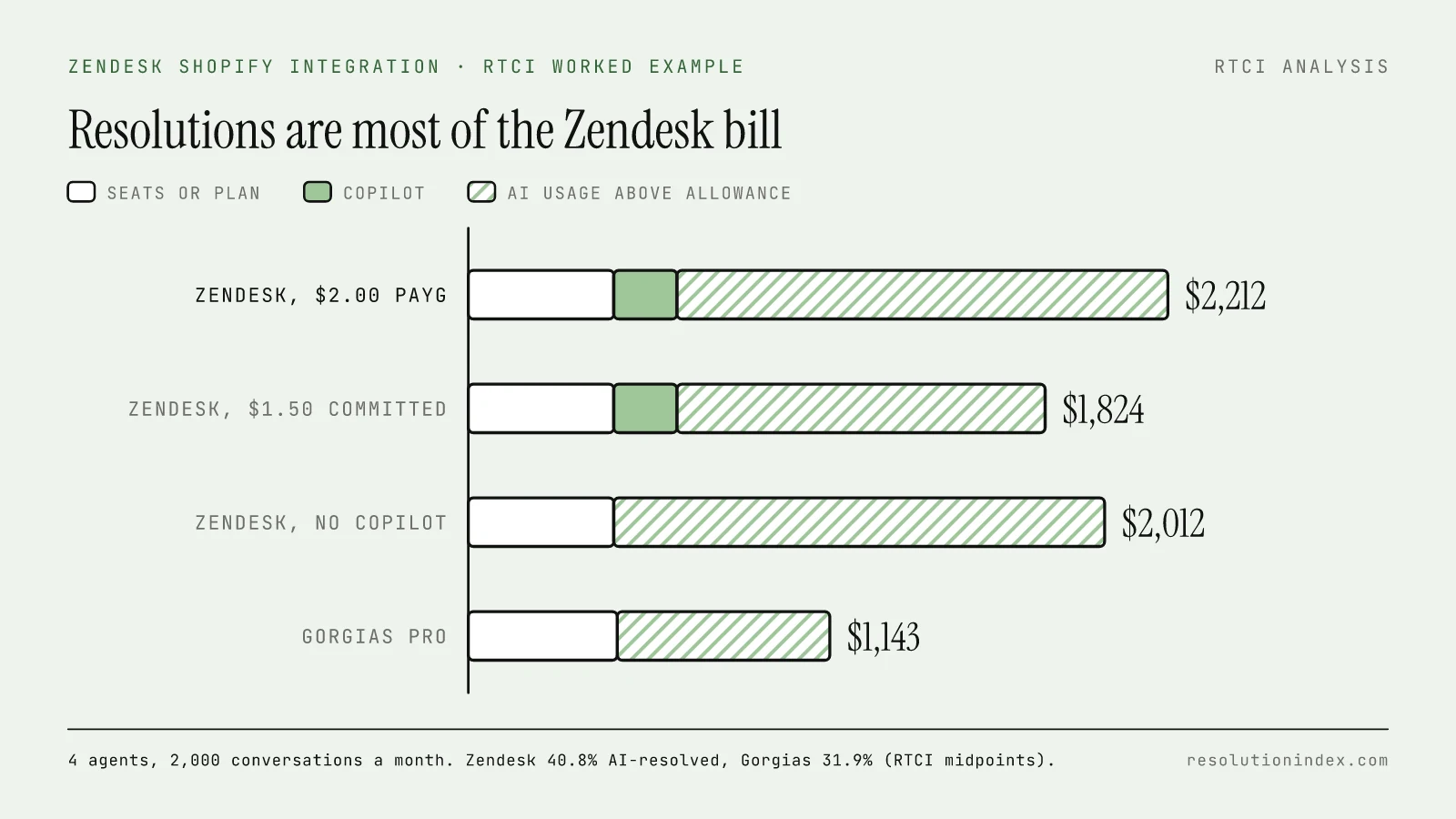
| Total, pay-as-you-go | $460 + $200 + $1,552 | $2,212 |
| Total at $1.50 committed (Nov 17 rate) | $460 + $200 + 776 × $1.50 | $1,824 |
| Total without Copilot, pay-as-you-go | $460 + $1,552 | $2,012 |
Across the 36–46% range, the pay-as-you-go total runs from $2,020 (720 resolutions) to $2,420 (920). On monthly billing the seats become 4 × $149 = $596, and the pay-as-you-go total is $2,348. All in, each AI resolution costs $2,212 ÷ 816 = $2.71 when seats and Copilot are spread over them, or $1,552 ÷ 816 = $1.90 for the resolution charges alone.
For comparison, the same store on Gorgias: the Gorgias pricing guide lists Pro at $471 a month on annual billing with AI Agent, covering 2,000 tickets and 190 AI interactions, and $1.50 for each interaction above that. At Gorgias's RTCI midpoint of 31.9%, AI Agent handles 638 conversations, 448 above the allowance: $471 + 448 × $1.50 = $1,143 a month. Gorgias does not charge per seat, so that number does not change with 4 agents or 10. It handles fewer conversations at that rate (638 against 816), and Gorgias counts each AI interaction as a ticket too.
Where the integration falls short, and when a Shopify-native helpdesk fits better
The limits below come from Zendesk's own articles and listings:
- The AI agent cannot use the app. Order lookups by the AI need a custom action you build on Suite Growth or above, and Zendesk does not support that code.
- Refunds and cancellations are manual. A human clicks through review and confirm, then refreshes the sidebar. Cancellation works on unfulfilled orders only.
- Matching is by email or phone. A customer who writes from another address, or a new ticket not yet saved, shows no Shopify data.
- One widget brand per store. Only the default brand's Web Widget installs through the integration.
- Chat is being retired. Zendesk says Support-only customers need Chat to use the integration, so Suite is the practical path.
- Mixed merchant reviews. The Shopify App Store listing shows 3.2 stars from 96 reviews, with 29 of them one-star.
In RTCI's index (November 2026), Zendesk AI has a realistic resolution rate of 36–46% at $1.50–$2.00 per resolution, for an RTCI score of 592 (Moderate). Gorgias AI scores 636 (Moderate), with a realistic 27–37% at $0.90–$1.00 per automated interaction. The Intercom Fin vs Gorgias AI comparison covers Fin, which scores 696 (Strong) and can run on top of Zendesk.
Stay on Zendesk with the Shopify app if Shopify is one of several systems your team supports, you sell through other channels or run several brands, you need phone and complex routing, or you already run Zendesk and the question is how to add Shopify context. The Zendesk alternatives guide and ecommerce shortlist cover the trade-offs if you are deciding fresh.
Look at a Shopify-native helpdesk if Shopify is your only order system, most tickets are order status, cancellations and returns, and you want the AI to act on orders without building and maintaining API calls. Start with Gorgias pricing and the Gorgias alternatives. Whichever you pick, run a two-week pilot on your own order tickets and compare cost per verified resolution with the calculator.
Troubleshooting: documented errors and fixes
These are the Shopify integration issues Zendesk documents in its help center. RTCI has not reproduced them.
| Symptom | Cause Zendesk gives | Documented fix |
|---|---|---|
| "Oops, something went wrong" in Shopify while connecting | The Shopify admin lacks permissions for setup | The store owner grants General > Orders, General > Customers, General > Apps and channels, Online store > Themes and Administration > Manage settings, then retry (article) |
| "Your adblocker is preventing the Shopify sidebar app from loading" | A browser ad blocker filters Zendesk tracking endpoints | Turn the blocker off for your Zendesk subdomain, or allow the three listed endpoints (article) |
| "Failed to validate for sufficient access token scopes. Try again later" | The access token lacks the scopes the app now needs | Disconnect the storefront in Admin Center, then reconnect to issue a new token; if it persists, send HAR logs to Zendesk (article) |
| Zendesk app shows as "Unsupported" or "This app may not work as expected" in Shopify | A problem with the current connection | Disconnect the stores under Admin Center > Apps and integrations > Integrations > Shopify, then reconnect (article) |
| Sidebar shows no Shopify data on a ticket | The ticket is new and unsaved, or the requester's email or phone does not match Shopify | Save the ticket with a requester; check the customer's email and phone in Shopify (article) |
| Order status unchanged after a refund or cancel | The sidebar does not refresh itself | Click the refresh icon in the app |
How RTCI calculates these numbers
- Realistic resolution rate. Each vendor’s published claim is discounted by one fixed rule for every vendor, with an extra discount when the figure measures deflection rather than resolution.
- Cost per resolution. Per-session and per-conversation prices are divided by that realistic rate, because failed attempts are billed too. Mandatory platform fees are spread over 2,000 to 4,000 resolutions a month.
- Prices. Every price links to the vendor’s own page as of the date shown. Costs marked ~ or est. are RTCI estimates for vendors that publish no per-unit price.
Frequently asked questions
Is the Zendesk Shopify integration free?
The app is. Zendesk's Marketplace lists Shopify for Zendesk as a free integration built by Zendesk (checked November 20, 2026). You still need a Zendesk plan: Zendesk's setup article lists Suite Team, Growth, Professional, Enterprise and Enterprise Plus, or Support Team, Professional and Enterprise, and says Support customers also need Chat.
Can Zendesk's AI agent check Shopify order status?
Not out of the box, in the Zendesk documentation RTCI could open. Zendesk's own answer to that question says AI agents answer from help center articles by default, and that returning order status means building a script that calls the commerce platform's API. The documented route is a custom action, which Zendesk lists for Suite Growth and above, added to an AI agent procedure or dialogue block. Zendesk says it does not support the code or third-party APIs such as Shopify's.
Can agents refund or cancel Shopify orders from Zendesk?
Yes, once an admin turns on the Refunds and cancellations option for the Support sidebar app. Zendesk's article says refunds work on unfulfilled, partially fulfilled and fulfilled orders, as full or partial refunds with optional restock and shipping refund. Cancellations work only on unfulfilled orders. Zendesk adds a shopify_refunded or shopify_cancelled tag to the ticket afterwards.
What Shopify permissions does the Zendesk integration need?
Zendesk's Marketplace listing says you need administrator permissions in both Shopify and Zendesk. Its troubleshooting article lists the Shopify staff permissions that prevent the "Oops, something went wrong" error: General > Orders, General > Customers, General > Apps and channels, Online store > Themes, and Administration > Manage settings. The articles RTCI opened do not list the OAuth scopes; Shopify shows them on its permissions page when you connect.
Can I connect more than one Shopify store to Zendesk?
Yes. Zendesk's setup article says multiple storefronts can connect to one Zendesk account through New connection, and you must be logged in to that storefront in Shopify to add it. Each storefront gets its own sidebar app. Only the default brand's Web Widget can be added through the integration; other brands need the widget code pasted into the theme by hand.
What does Zendesk cost for a Shopify store?
RTCI worked example: 4 agents on Suite Professional at US$115 each on annual billing ($460), Copilot at $50 each ($200), and 2,000 conversations a month with 40.8% resolved by the AI agent. That is 816 resolutions, 776 of them above the 40 included, which cost $1,552 at the US$2.00 pay-as-you-go rate. Total: $2,212 a month. At the $1.50 committed rate RTCI recorded on November 17, it is $1,824.
Why is the Shopify app in Zendesk not showing any data?
Zendesk documents three causes. A browser ad blocker can stop the sidebar app loading (allowlist your Zendesk subdomain). Shopify data does not show on a new ticket until it is saved with a requester. And the app matches the requester's email address or phone number to Shopify, so a customer writing from a different address will not match.
Change log
- Published.
Read next
Keep reading
Picked for this article: the pieces it cites and the ones that answer the next question buyers usually ask.
Most related
Integrate AI Support with Your Existing Helpdesk
A phased plan for adding AI resolution to Zendesk, Freshdesk, Intercom or Salesforce Service Cloud without replacing the helpdesk: integration patterns by helpdesk type, a deflect/draft/escalate/auto-resolve decision table, a 25-item readiness checklist and cost math.
Zendesk Pricing 2026: Plans, AI Agents and Resolution Costs
Zendesk pricing as of November 2026: plans from $19 per agent, AI agents billed per automated resolution, the May 2026 tier change, and worked monthly bills.
Best AI Support Platforms for Ecommerce (2026)
Ecommerce shortlist: Gorgias, Yuma, Richpanel, Intercom Fin, Gladly, Decagon, and Zendesk AI compared on order actions, returns, subscriptions, Shopify depth and cost per verified resolution, with worked cost examples from published prices.
Gorgias Pricing 2026: Plans, AI Agent Fees and Cost per Resolution
Gorgias pricing as of November 19, 2026: what each plan costs with AI Agent switched on, the $1.50 AI overage, the ticket double count, and a worked monthly bill at 250, 1,800 and 5,000 tickets.
Zendesk Alternatives 2026: 8 Compared on AI Cost per Resolution
Eight Zendesk alternatives ranked on RTCI's score and AI cost per resolution as of November 2026, split into AI layers that run on Zendesk and full helpdesk replacements, with a worked month at 5,000 tickets.